9th Thing – Wikis
What is a wiki?
Wiki is taken from the Hawaiian word wiki wiki meaning quick or swift. In Web 2.0 terms a wiki is a website in which content can be added, edited and changed by a group of members. This means a wiki is great way of getting people working together and collaborating online.
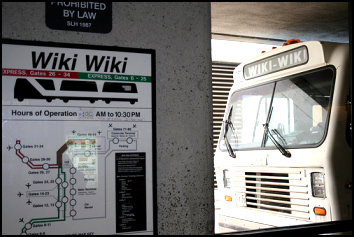
(The Wiki Wiki bus, by Kables)
Some of the benefits that make wikis so attractive are:
- anyone (registered or unregistered, if unrestricted) can add, edit or delete content
- tracking tools within wikis allow you to easily keep up on what been changed and by whom
- earlier versions of a page can be viewed and reinstated when needed
And users do not need to know HTML in order to apply styles to text or add and edit content. In most cases simple syntax structure is used.
Are all wikis open to everyone?
No, the ethos of sites like Wikipedia is to be open and allow anyone to contribute – a wonderful idea, but this can cause problems. However, in most cases you will only want certain people to be able to contribute or even to see your wiki, especially if you’re using it in a work context.
Watch this short film to see just how useful wikis can be…
Watch this video to see how easy it is to contribute to a wiki…
Note: As of 2013, wetpaint.com is no longer in the business of wiki-hosting. There are plenty of other free wiki-hosting services. Examples are PBworks, Wikidot and Wikispaces. You’ll get a chance to try out PBworks this week!
10th Thing – Wikipedia
Some of you will have seen and most likely used Wikipedia to find information.
Step 1: Choose the random article link, keep clicking on it until you find an article that interests you, and write about it in your blog.

Step 2: Click on current events link and see what’s in the news – put this in your blog post too. Be sure to click on the “talk” or “discussion” tab on the article to see what people are saying about it. (What are talk pages?)

11th Thing – PBworks
Here you’ll get a chance to contribute to a wiki.
Check out the 23 Things @ PPL 2015 Wiki hosted by PBworks. Anyone can view this wiki but you’ll need to request access to edit it. Please do so! If you don’t get approved within a few hours, please send Nicole (nicole.carter@smu.ca) an email with an email address you’re using for the 23 things programme.
The objective of Thing 11 is to add some content to our wiki to create a “Guide to Delicious Halifax“; a compilation of all our favourite restaurants, recipes, etc. We’ve already added some content to the wiki but it will be much better once everyone has added something to it.
Let’s Get Wiki’d!
Step 1: Go to the wiki and click on the Guide to Delicious Halifax link.
Step 2: Browse through the wiki site and select one of the pages that you would like to add some new content to — it might be to add your favourite restaurant, your favourite recipe or to add further detail to what others have already posted.
Step 3: Once you are looking at the relevant page in the wiki (which might be blank if no-one has added any content yet), click on the “Edit” button. You should now be able to edit the text of the page. You can use the toolbar to format the text and, if you are feeling adventurous, you can add links to other pages, even new pages.
If the page doesn’t already exist, then select “Add Link” (as shown below).
Don’t forget to click on the “Save” button periodically!

If you enjoyed adding content to the wiki, explore some of the other links in the “Guide to Delicious Halifax” and either add new content or update some of the existing pages! You can think of this wiki as an ever-evolving beast that no one is in charge of. We all have an equal say in what direction it takes, as directed by what we all put on it. It becomes what we all make it.
Optional tasks
Optional task 1: Explore some of the wikis hosted on the Wikia web site. There’s plenty to choose from, including Wookieepedia (Star Wars), Muppet Wiki, Psychology Wiki, and the Recipes Wiki.
Optional task 2: Write a new blog post about your experiences with wikis. Do you think they are useful tools?
Optional task 3: Create your own wiki using PBworks. Watch this video for all the details: https://www.youtube.com/watch?v=SZ5OV14v4xU And, of course, blog about it if you want your followers to view or contribute to it!
 23 Things @ PPL 2015